![HRPS Logo1.png]](https://knowledgebase.hrperformancesolutions.net/hs-fs/hubfs/HRPS%20Logo1.png?height=50&name=HRPS%20Logo1.png)
To Share a Strategy with Appraisers
Click System Configuration, then Content Management.
Navigate to the Appraisal Content section.
Click on the Goal & Strategy Library tab.
Click on the Strategies sub-tab and click the Share tab.
NOTE
As an Administrator, you can share an entire category or just an individual strategy.
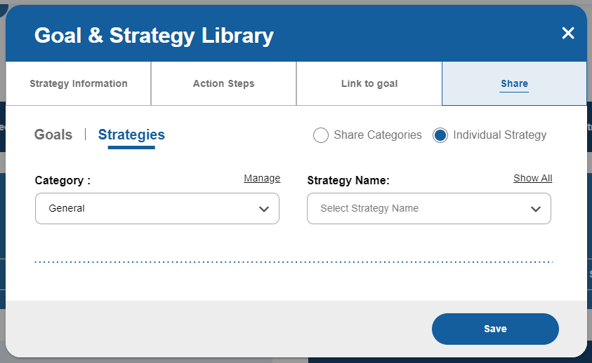
To Share a Category
Select the Share Categories radial button.
From Categories to Share, select the category to which the strategy is assigned.
Click Save.
To Share an Individual Strategy
Select the Individual Strategy radial button.
From the Category dropdown list, select the category the strategy is assigned.
From the Strategy Name, select the desired strategy.
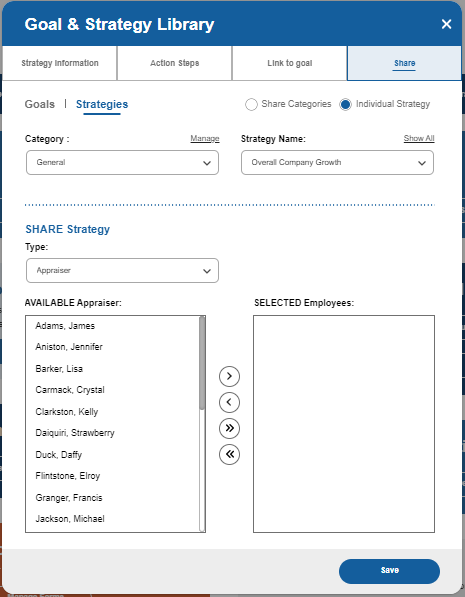
Move down the screen to the SHARE Strategy section.
From the Type dropdown, select the role or Company Unit to which you want to share the strategy.
When all recipients have been selected, click Save.