![HRPS Logo1.png]](https://knowledgebase.hrperformancesolutions.net/hs-fs/hubfs/HRPS%20Logo1.png?height=50&name=HRPS%20Logo1.png)
NOTE
If the Ready Notification is enabled, Performance Pro will automatically send an email to the manager letting them know when their employee marks their self-appraisal as ready. If this setting is not enabled, the employee will need to click the Notify Appraiser option on the Ready screen in order for the manager to be notified.
To activate the Ready Notification
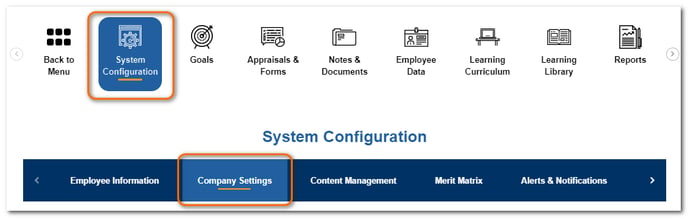
Click System Configuration.
Click Company Settings.
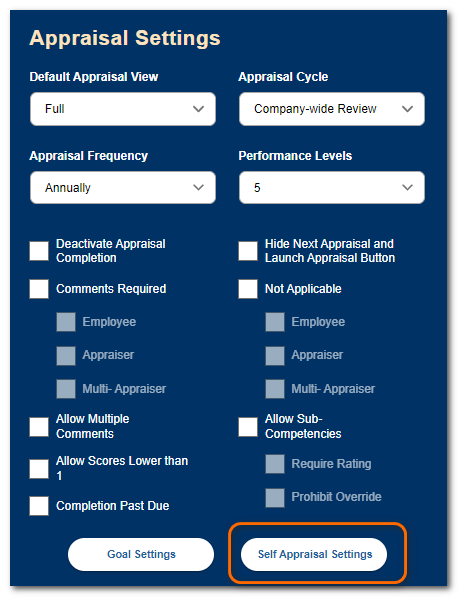
Under Appraisal Settings, click Self Appraisal Settings.
Click the Ready Notification checkbox.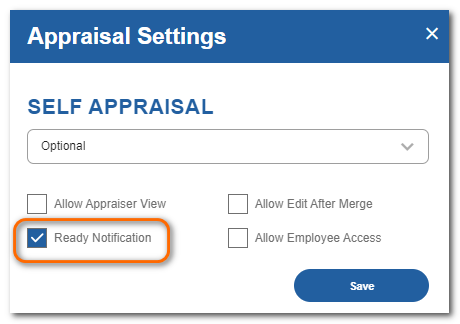
Click Save.
Performance Pro will automatically send an email to the manager when their employee marks their self-appraisal as ready.