![HRPS Logo1.png]](https://knowledgebase.hrperformancesolutions.net/hs-fs/hubfs/HRPS%20Logo1.png?height=50&name=HRPS%20Logo1.png)
There may be circumstances where you wish to copy a goal from the last historical appraisal to the current appraisal. If "Employees Can Add Goals " is activated in Company Settings, employees will also have this ability.
To Import Goals from the Previous Appraisal
Click Employee Documents.
Click Employee Goal Tools.
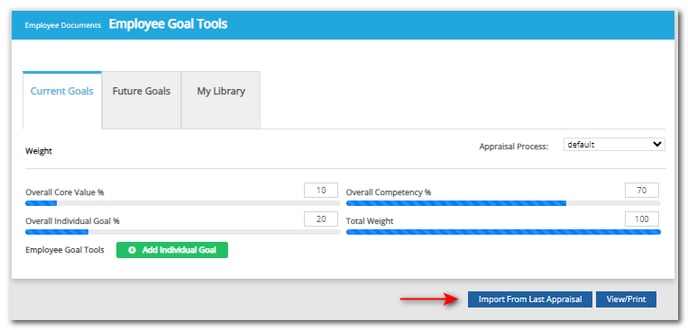
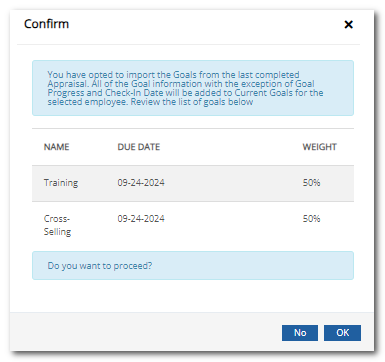
Click Import From Last Appraisal. The goals from the last appraisal will appear. If no goals appear, it means there is either not a completed appraisal, or the last appraisal did not contain goals.
Click OK to confirm. This will import all goals. You may then delete goals you don’t want included.
The imported goals will now display on the Current Goals tab. Edit as needed.
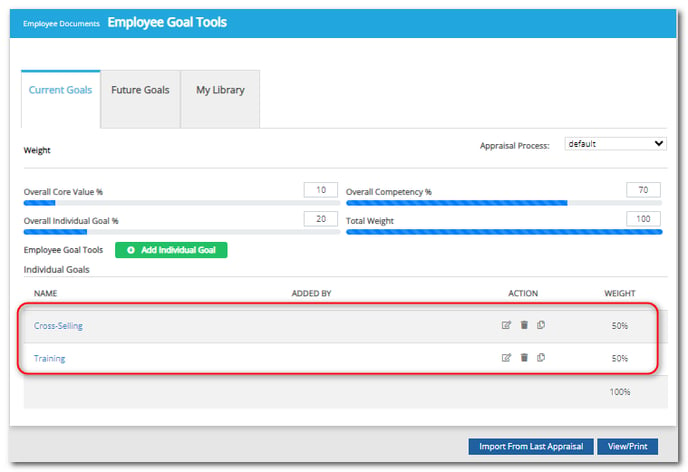
Note: Goal details, such as due dates, must be updated to reflect the new review period. Weights may also need to be adjusted to total 100%.
Note: If an employee imported a goal from their own last appraisal, they cannot edit the goal directly, but they can make suggested changes to it by clicking the "Propose Changes" button and submitting those changes to the manager for review.
Did this answer your question?