![HRPS Logo1.png]](https://knowledgebase.hrperformancesolutions.net/hs-fs/hubfs/HRPS%20Logo1.png?height=50&name=HRPS%20Logo1.png)
TIP
If you need more than two appraisers to evaluate an employee, you can use the Multi-Appraiser feature instead of Shared Appraisers.
Enable Shared Appraisers Feature
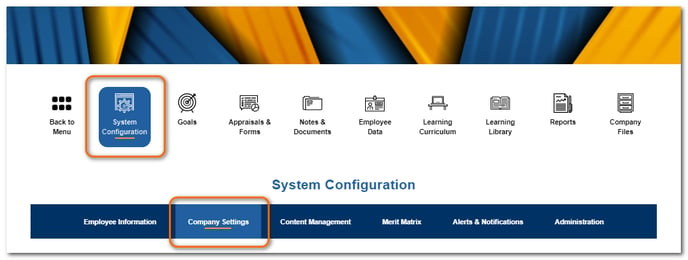
Click System Configuration, then Company Settings.
Under Advanced Features, check Shared Appraisers, then click Save.
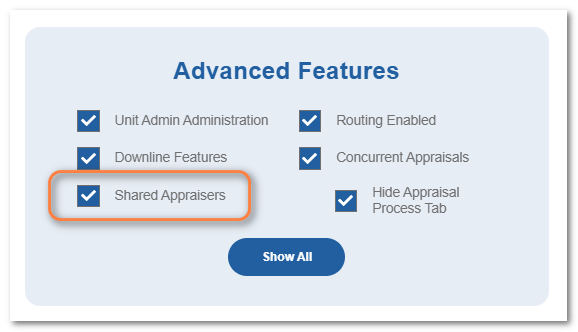
Note: When you have Shared Appraisers enabled and at least one employee has two assigned appraisers, the setting will be grayed-out. You can not disable this feature with active shared appraiser assignments.
To Assign a Second Appraiser to an Employee
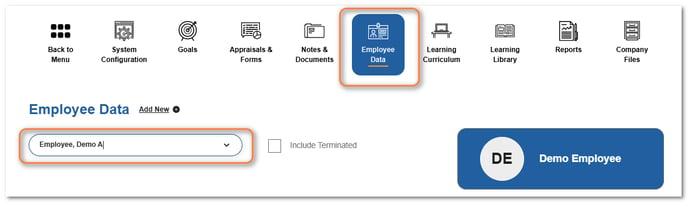
Click Employee Data and then select the employee.
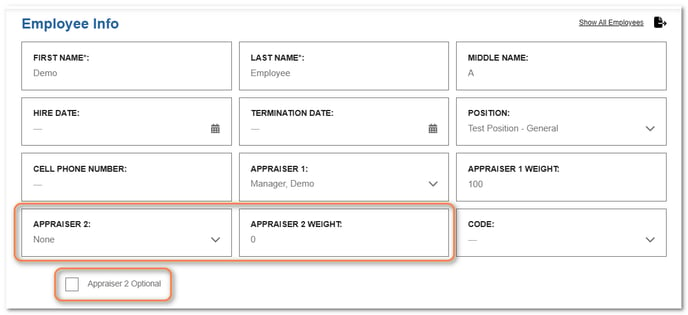
Select a second appraiser from the Appraiser 2 dropdown and assign a weight. Mark Appraiser 2 as optional if desired.
NOTE
If Appraiser 2 has assigned weight, they cannot be marked optional. If Appraiser 2 is optional, the appraisal would be able to be completed without any input from them.
Click Save.