![HRPS Logo1.png]](https://knowledgebase.hrperformancesolutions.net/hs-fs/hubfs/HRPS%20Logo1.png?height=50&name=HRPS%20Logo1.png)
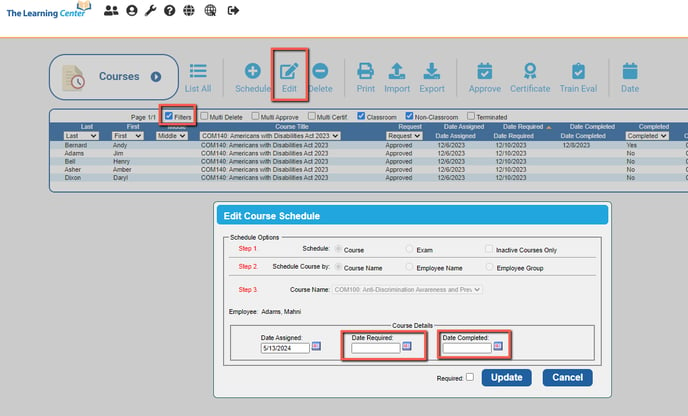
To edited the Required or Completion date for a course:
- Select Schedules from the Admin Menu and the Courses screen will open.
- Click the Filters checkbox to narrow down necessary criteria, whether it is by the employee name and/or a specific course title, using the dropdown filters, ensuring the correct entry is selected.
- Select the Edit function and change the date(s), then select Update.
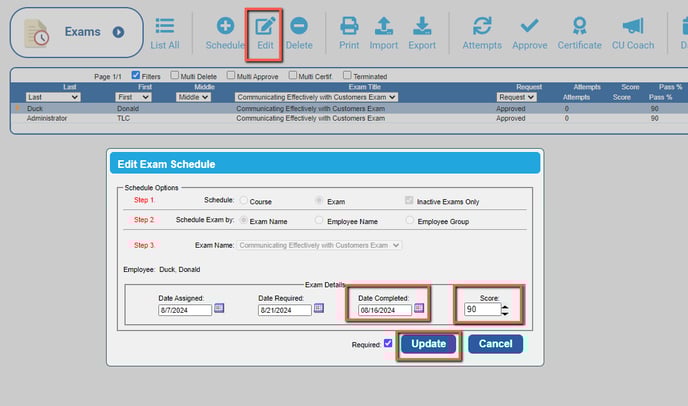
To edit a Required or Completion date for an exam:
- Select Schedules from the Admin menu and click on the arrow to open additional folders to Exams.
- Click the Filters checkbox to narrow down necessary criteria, whether it's by the employee name and/or a specific course title, using the dropdown filters, ensuring the correct entry is selected.
- Select the Edit function and change the date(s)
- If you are force completing an exam, make sure to enter a passing score for the exam.
- Select Update to complete.