![HRPS Logo1.png]](https://knowledgebase.hrperformancesolutions.net/hs-fs/hubfs/HRPS%20Logo1.png?height=50&name=HRPS%20Logo1.png)
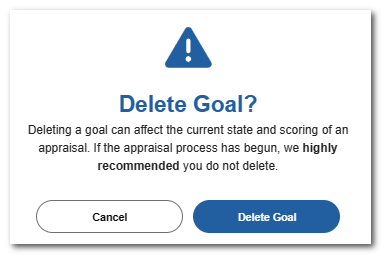
Caution: When a goal is deleted, it is completely removed from Performance Pro. There is no archive or backup file from which to retrieve deleted goals. Delete goals with caution!
Click Goals.

Select the employee and from the All Appraisals dropdown select the appraisal the goal is assigned to.

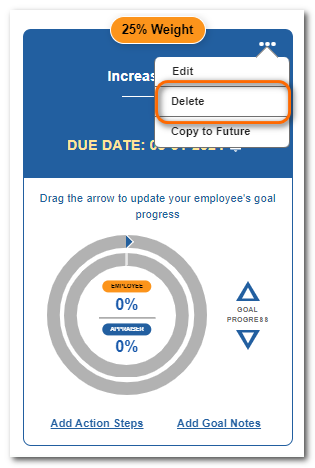
Click the ... on the appropriate goal and Delete.
Click Delete Goal to confirm.
- Administrators can delete any goal.
- Appraisers can delete goals they have added and goals the employee has added.
- Employees can only delete goals they have added up until the time the appraiser reviews the goal and re-saves it.
- Once that goal is re-saved by the appraiser, the employee can no longer delete it.
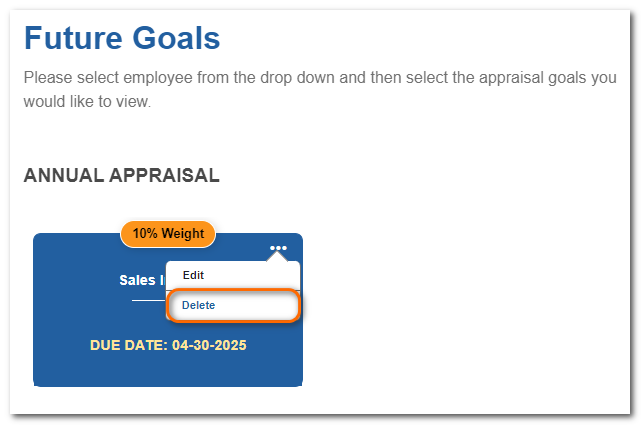
Deleting a future goal follows the same process as above. Select the goal from the Future Goals area.