![HRPS Logo1.png]](https://knowledgebase.hrperformancesolutions.net/hs-fs/hubfs/HRPS%20Logo1.png?height=50&name=HRPS%20Logo1.png)
Basic Settings
Allow Appraiser Assigning Rights: Allows primary appraisers to assign multi-appraisers to their direct reports. Administrative Users can always make these assignments, Groups must be created, and users assigned to them in order to finish setting up this function.
Multi-Appraiser Selection Notify: Will notify multi-appraisers via e-mail whenever they are assigned to an employee.
Lock Primary Appraiser Weight: Locks the assigned weight of the primary appraiser.
Allow Multi-Appraiser to Opt Out: Allow assigned multi-appraisers to opt in/out of performing a multi-appraisal. Notify all currently assigned multi-appraisers or only those assigned after turning on this setting. Establish a due date by which opt in/opt out status must be set. If not set by this date, the multi-appraiser will be marked optional on assigned appraisals. (See Performance Pro Release Documents 3.19.15 for more information on this feature.) 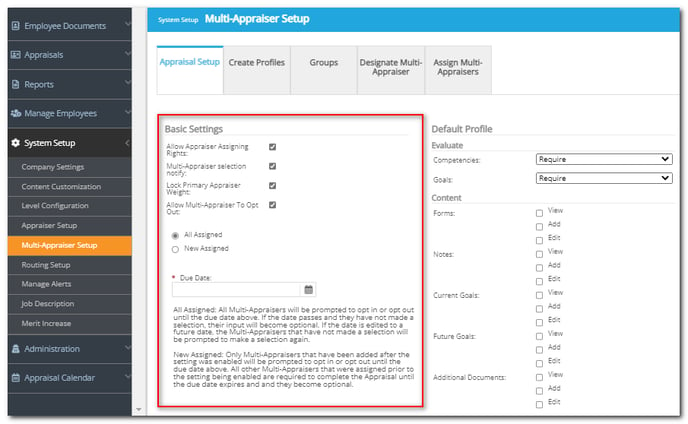
Default Profile
When appraisers are designated as a multi-appraiser they will automatically be given permissions of the Default Profile, unless you assign them a different Profile on the Create Profiles tab > Assign Profiles sub-tab.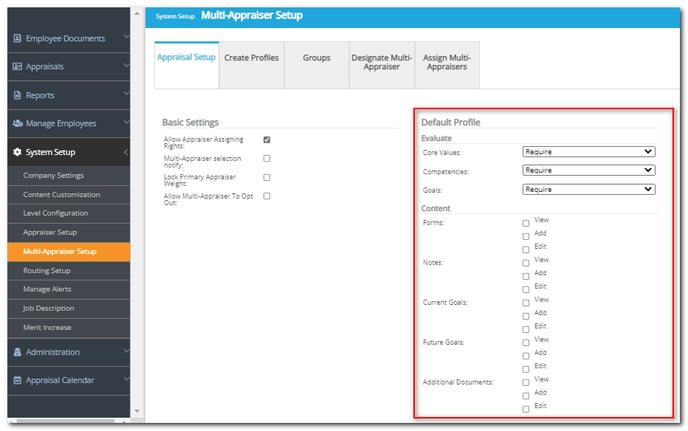
To Customize the Multi-Appraiser Default Profile
Click System Setup.
Click Multi-Appraiser Setup.
Choose the desired options under "Default Profile."
Click Save.
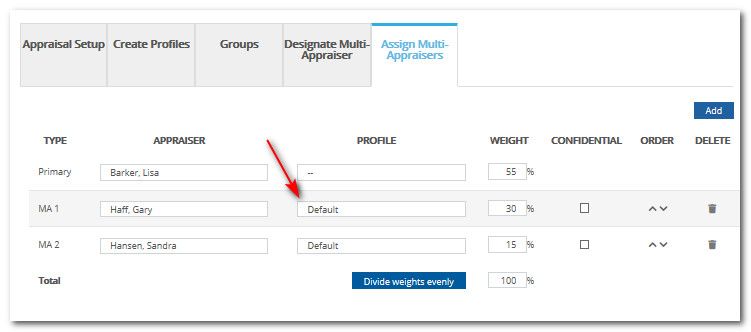
The profile that a multi-appraiser is assigned to displays in the "Profile" column of the "Assign Multi-Appraisers" tab when assigning that multi-appraiser to an employee.
 Did this answer your question?